

Quick Summary
A good thumb brace for texting gives light support at the base of the thumb while leaving your fingers free to move. Choose the least support that still eases pain, and check the fit against the manufacturer's size chart. Then run a short phone test before the return window closes.
- Start with the least support that still eases your pain, such as a flexible thumb brace.
- A thumb spica splint is firmer and suits short-term rest better than daily phone use.
- Measure thumb and wrist circumference and compare against the specific product's size chart.
- Check for tingling, pale fingertips, or rotating braces after 10 to 15 minutes of wear.
- Run a five-minute phone test covering typing, scrolling, grip, and dictation before committing.
Table of Contents
- Why Texting Strains the Thumb and When a Brace Helps
- Decide Your Support Level: Stabilizer, Splint, or Spica
- Pick a Thumb Splint for Texting That Leaves Your Fingers Free
- Get the Right Thumb Brace Fit and Sizing
- Test the Brace With Your Phone Before You Commit
- Wear Schedule, Warning Signs, and Relief Options for Texting Thumb Pain
- Your Next Step: Choosing a Brace and Checking In With a Clinician
- Frequently Asked Questions
Why Texting Strains the Thumb and When a Brace Helps
Last Updated: November 1, 2026
Texting thumb is a common strain from repeated thumb movement on a phone.
Repetitive thumb use can irritate the tendons and joints at the base of the thumb.
A 2026 study in BMJ Open looked at texting-thumb symptoms among medical students using a validated questionnaire (BMJ Open study on texting thumb among medical students).
A brace may help when:
- Pain shows up mainly during phone use
- Your thumb feels unstable when you pinch or grip
- You want to rest the joint during long messaging sessions
If you have swelling, numbness, weakness, or pain that wakes you at night, see a clinician before you rely on a brace (the NHS).
Decide Your Support Level: Stabilizer, Splint, or Spica
Thumb supports range from light stabilizers to firm splints. More support limits movement more, which can matter when you want to text. Start with the least support that still eases your pain. You can compare the best finger splints for arthritis support to see which level of joint support fits your situation.
Thumb Brace Versus Thumb Spica Splint
A thumb brace usually covers the thumb and part of the wrist with soft or semi-rigid material. A thumb spica splint is firmer and holds the thumb joint and wrist more still. The spica style limits texting more, so it suits short-term rest better than daily phone use.
- Thumb brace: Flexible, comfortable, good for daily activity
- Thumb spica splint: Firmer, better for rest or flare-ups, harder to text in
Thumb Brace Versus Wrist Brace
A wrist brace controls the wrist more than the thumb. For a side-by-side look at a sleeve versus a splint for thumb pain, see Compression sleeve vs splint for thumb pain. If your pain sits at the base of the thumb, a wrist brace alone may not give enough support there. If your pain runs up into the forearm or wrist, a wrist brace may be a better starting point.
The article contrasts a thumb brace with a thumb spica splint and a wrist brace, so the main differences look like this:
| Support type | Best for | Key difference |
|---|---|---|
| Thumb brace | Daily activity | Flexible, comfortable, covers thumb and part of wrist |
| Thumb spica splint | Rest or flare-ups | Firmer, holds thumb joint and wrist more still |
| Wrist brace | Pain running into forearm or wrist | Controls wrist more than thumb |
Pick a Thumb Splint for Texting That Leaves Your Fingers Free
For texting, look for a design that holds the thumb steady but leaves the fingers mobile. The Penguin Fingers Finger Splint Wrap is one option to consider for light support while your fingers stay free to move.

When you compare options, check these details:
- Open fingertips or free finger movement
- Adjustable straps you can tighten or loosen quickly
- Soft lining
Keep in mind that a brace you can't comfortably use with your phone may not be the right choice for texting, even if it feels supportive when you're resting.
Get the Right Thumb Brace Fit and Sizing
Fit is the single biggest reason a thumb brace ends up in a drawer. A brace that is too loose slides down the thumb and rubs the web space; one that is too tight can cause discomfort and tingling. Because sizing varies by manufacturer, check the specific product's size chart before you order.
How to Measure
Use a soft tailor's tape, or wrap a strip of paper around the area and mark it against a ruler.
- Thumb circumference: Measure around the base of the thumb, right where the thumb meets the wrist (the metacarpophalangeal joint area). Keep the tape snug but not indenting the skin.
- Wrist circumference: Measure around the wrist just below the wrist bone, the same spot a watch band sits.
- Hand length (some brands): Measure from the crease at the base of the palm to the tip of the middle finger.
Write the numbers down in inches or centimeters, whichever the manufacturer's chart uses, and compare against that specific product's chart, not a generic size guide. Sizing varies widely between brands, and a medium in one line can match a large in another.
Penguin Fingers Finger Splint Wrap →
Signs of a Bad Fit
Check for these after 10 to 15 minutes of wear:
- Too tight: Thumb or fingertips turn pale, cool, or tingle; red indentations that don't fade within a minute of removing the brace; throbbing at the base of the thumb.
- Too loose: The brace rotates around the thumb when you type; the rigid stay migrates off the painful joint; you have to re-tighten straps every few minutes.
- Pressure points: Sharp rubbing at any contact point on the hand or wrist.
Adjust Straps Without Killing Support
Most thumb braces use two or three hook-and-loop straps. A common pattern is that the strap closest to the thumb tip controls how much the thumb can bend, while the wrist strap controls wrist stability. Tighten the thumb strap first, then the wrist strap, and leave the middle strap slightly looser so the brace can flex with your hand. If you loosen a strap to relieve pressure, recheck that the rigid insert still sits over the painful joint, a loose brace that no longer supports the target area is worse than no brace at all.
If you have a condition that affects circulation or sensation, check your skin regularly during the first few days of wear.
Test the Brace With Your Phone Before You Commit
Most brace guides stop at "try it on." But a brace that feels fine while you sit still can fail the moment you start texting. Before you commit, and before the return window closes, run the brace through the tasks you actually do on your phone. This is the step almost no other guide covers, and it is the one that decides whether a brace earns a place in your daily routine.
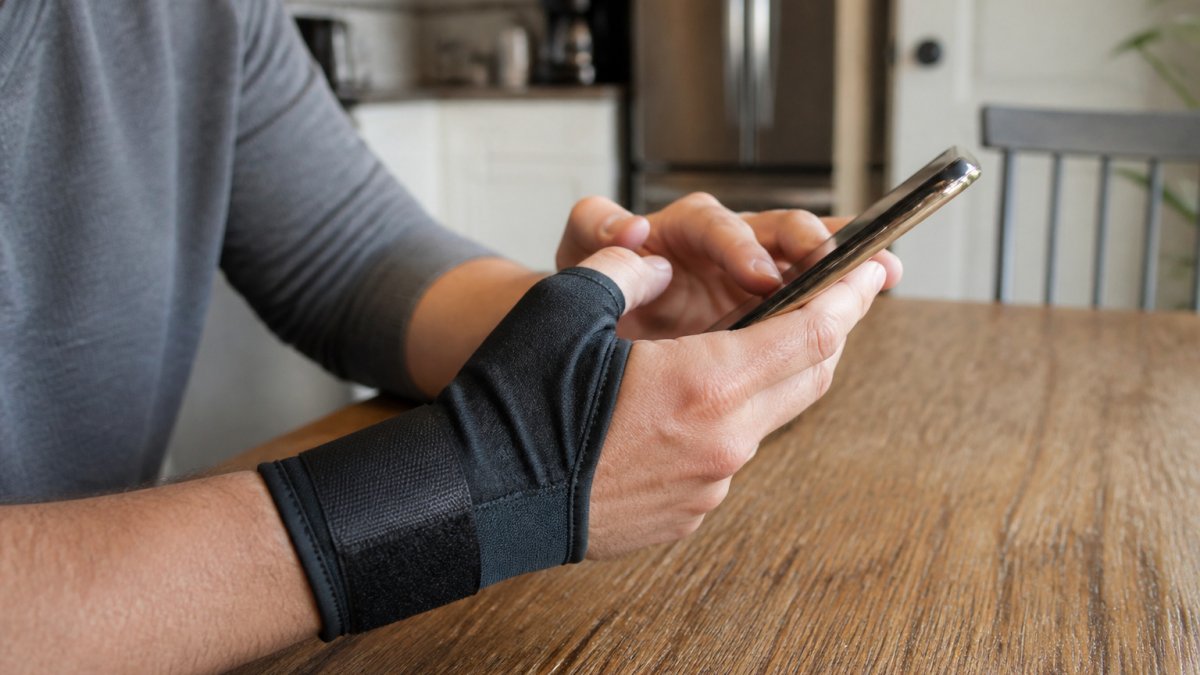
The Five-Minute Phone Test
Put the brace on, pick up your phone, and work through these checks in order:
- Touchscreen access: Type a two-sentence message using your normal thumb. Can your thumb pad reach the keys without the brace edge dragging on the glass? Does the brace cover the fingertip or push your thumb into an awkward angle?
- One-handed use: Hold the phone in the braced hand and scroll with the same thumb. If the brace forces you to switch hands or use two hands for basic scrolling, it will be hard to live with.
- Grip and pinch: Pick up a phone case, a coffee mug, or a set of keys. A brace that blocks pinch grip makes everyday tasks harder, not easier.
- Long-session comfort: Scroll a feed or answer messages for 10 minutes straight. Note any rubbing, heat buildup, or new ache at the base of the thumb.
- Dictation and voice input: Try the phone's voice-to-text feature. Dictation can be an option for messaging while you rest your thumb, and testing it can show whether the brace leaves your hand free enough to hold the phone while you speak.
What "Passing" Looks Like
A brace passes if you can send a short message, scroll for several minutes, and pick up a light object without new pain, without the brace shifting position, and without your thumb cramping. It fails if typing speed drops sharply, if the brace edge catches the screen, or if you notice numbness or tingling during the test.
Stop the test and remove the brace if you feel numbness, tingling, or a cold thumb. Those are signs of a strap that is too tight or a brace that does not fit your hand shape, not something to push through.
If the Brace Fails the Test
- Too restrictive: Step down to a lighter stabilizer or a flexible wrap that leaves the fingers free.
- Too loose or shifting: Try a smaller size or a design with a more contoured thumb stay.
- Rubs the screen edge: Look for a brace with a low-profile thumb cover or open fingertip.
Wear Schedule, Warning Signs, and Relief Options for Texting Thumb Pain
Many people wear a brace only during phone use or activities that cause pain. Long, constant wear can make the thumb weaker over time, so ask a clinician how long you should wear a brace each day.
Stop wearing the brace and seek care if you notice:
- Numbness or tingling in the thumb or fingers
- Swelling that doesn't go down
- Skin redness, sores, or irritation
Other relief options that many people use alongside a brace include:
- Taking regular breaks from phone use
- Holding the phone with both hands when possible
- Using a cold compression wrap for short periods to ease soreness
The Penguin Fingers Wrist Cold Compression Pack is one option for people who want cooling and compression for an aching wrist after long days of typing or phone use.

Your Next Step: Choosing a Brace and Checking In With a Clinician
Choosing a thumb brace for texting comes down to three things: how much support you need, how much finger movement you want, and whether the fit feels right. Start with light support, test it during real phone use, and adjust from there.
If your pain lasts more than a few weeks, gets worse, or affects your daily life, talk with a clinician. If you are ready to compare options, see the best cold compression sleeves for finger arthritis.
Frequently Asked Questions
What is a good splint for texting thumb?
A good splint for texting thumb is a lightweight, adjustable thumb stabilizer that holds the thumb joint in a neutral position while leaving the index finger and the tip of the thumb free. Look for soft lining, smooth edges, and straps that can be adjusted easily. Because a splint that restricts too much will make touchscreen use awkward, test it with your phone before relying on it for daily messaging. Penguin Fingers offers a Finger Splint Wrap for $7.95 if you want a low-cost option to compare against a full thumb brace.
What is the difference between a thumb splint and a thumb brace?
The terms are often used interchangeably, but a thumb splint usually refers to a rigid or semi-rigid device that immobilizes the thumb joint, while a thumb brace is a broader term for any support worn on the thumb, including soft stabilizers. A thumb spica splint extends onto the wrist to limit movement at the base of the thumb more strictly. For texting, a lighter stabilizer or brace is generally more practical than a full spica splint, since it preserves enough motion for touchscreen use.
Should a thumb brace immobilize the wrist as well as the thumb?
Not always. A thumb brace that extends over the wrist (a spica design) limits both thumb and wrist movement, which can help when the pain comes from the base of the thumb and the wrist is also involved. For texting-related strain, many people only need the thumb joint supported, and a wrist-free design keeps the wrist mobile. If you have pain in the wrist as well as the thumb, a clinician can help you decide how much immobilization is appropriate.
When should I see a health care professional about thumb pain from texting?
See a health care professional if thumb pain lasts more than a few weeks despite rest and a brace, if you notice swelling, numbness, tingling, weakness, or a loss of grip strength, or if the pain wakes you at night. Persistent symptoms can point to tendon irritation, arthritis, or nerve involvement that needs a formal evaluation. A brace is a support tool, not a diagnosis, so use it alongside professional guidance when symptoms do not improve.


