

Last Updated: October 29, 2026
Quick Summary
These 10 carpal tunnel stretches take under a minute each and need no equipment: wrist extension and flexion, prayer stretch, median nerve glide, tendon gliding, finger stretch, fist squeeze, palm-up forearm stretch, wrist rotation, and slow finger curl. Do two to three short sessions daily, plus a two-minute reset every 90 minutes of typing.
- Hold wrist extension and flexion stretches for 15 to 30 seconds and repeat 2 to 4 times per hand.
- Nerve glides should feel gentle, never sharp; do 5 to 10 reps once or twice a day.
- A two-minute reset every 90 minutes beats one 15-minute session you skip.
- Keep wrists neutral: elbows near 90 degrees and forearms roughly parallel to the floor.
- Stop stretching and see a doctor if numbness becomes constant or you start dropping things.
Table of Contents
- Why Carpal Tunnel Stretches Belong in Your Workday
- 10 Simple Carpal Tunnel Stretches You Can Do at Your Desk
- Carpal Tunnel Exercises at Desk: A Workday Routine That Fits Your Schedule
- Carpal Tunnel Nerve Glides: How to Do Them Without Flaring Symptoms
- How Often to Do Carpal Tunnel Stretches for Real Relief
- Ergonomic Tips for Carpal Tunnel at Work: Set Up Before You Stretch
- When Stretching Isn't Enough: Cold Compression and Your Next Step
- Frequently Asked Questions
Why Carpal Tunnel Stretches Belong in Your Workday
If you type for a living, your hands take a beating.
They are not. Movement helps.
The carpal tunnel is a narrow passage in your wrist. The median nerve runs through it (Carpal Tunnel Syndrome).
But here is what most guides get wrong: they hand you a list and never tell you when to do it, how often, or when to stop.
If your wrist pain comes from typing, our guide on how to treat wrist pain from typing covers a fuller plan beyond stretching.
10 Simple Carpal Tunnel Stretches You Can Do at Your Desk
You need no equipment for these. Each move takes under a minute. Do them slowly and gently, never to the point of pain.
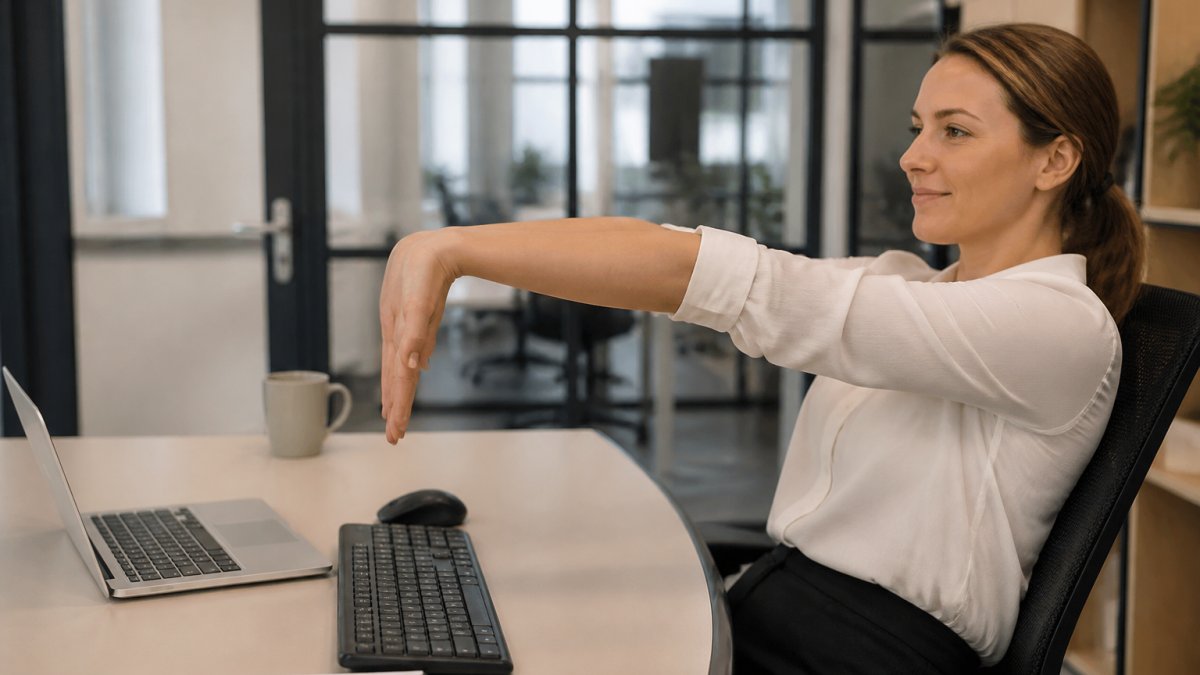
1. Wrist Extension Stretch
Hold your arm straight out with your palm facing down. Use your other hand to gently bend your fingers toward the floor until you feel a stretch along the top of your forearm. Hold for 15 to 30 seconds, then release. Repeat 2 to 4 times per hand.
2. Wrist Flexion Stretch
Flip the move. Extend your arm with your palm facing up. Use your other hand to pull your fingers gently toward your body. You should feel this along the inside of your forearm. Hold 15 to 30 seconds. Repeat 2 to 4 times.
3. Prayer Stretch
Press your palms together in front of your chest, fingers pointing up. Lower your hands toward your waist while keeping your palms together. Stop when you feel a stretch in your wrists. Hold 15 to 30 seconds. This one is a favorite for quick desk relief.
4. Median Nerve Glide
Make a fist with your thumb tucked inside your fingers. Slowly open your hand and spread your fingers wide. Then gently bend your wrist back. Move through each position slowly, without force. Repeat 5 to 10 times. Nerve glides should feel gentle, never sharp.
5. Tendon Gliding Sequence
This move walks your fingers through five positions: straight, hook fist, full fist, tabletop, and straight fist. Move through each one slowly. Repeat the sequence 5 to 10 times. Tendon gliding keeps the tendons sliding smoothly through the carpal tunnel.
6. Finger Stretch and Thumb Separation
Open your hand wide with fingers spread. Slowly separate your thumb from your palm as far as comfortable. Hold for a few seconds, then relax. Repeat 5 to 10 times per hand.
7. Fist and Hand Squeeze
Make a soft fist, then release and open your fingers wide. Squeeze gently, never hard. Repeat 10 times. This builds light strength and keeps your hand moving through its full range of motion.
8. Palm-Up Forearm Stretch
Hold your arm at shoulder height with your palm facing up. Use your other hand to gently press your fingers down toward the floor. Hold 15 to 30 seconds. This targets the forearm muscles that tighten during long typing sessions.
9. Shoulder-Height Wrist Rotation
Raise your arm to shoulder height. Slowly rotate your wrist in circles, first one way, then the other. Keep the motion small and controlled. Do 10 rotations each direction. This loosens the whole hand and wrist chain.
10. Slow Finger Curl and Release
Start with your fingers straight. Curl them slowly into a loose fist, one joint at a time. Then uncurl them just as slowly. Repeat 10 times. The slow pace is the point here. It calms the hand after a long stretch of typing.
Carpal Tunnel Exercises at Desk: A Workday Routine That Fits Your Schedule
Carpal tunnel exercises at desk level work best when you attach them to things you already do. You do not need a 20-minute block.
A practical pattern most hand therapists recommend is a short session every 60 to 90 minutes of continuous keyboard or mouse work, plus one longer reset after lunch.
Try this routine:
| Time | What to Do | Duration |
|---|---|---|
| First break (about 90 minutes into the day) | Wrist extension and flexion stretches | 2 minutes |
| Mid-morning | Prayer stretch and tendon gliding | 3 minutes |
| After lunch | Median nerve glide and finger stretch | 2 minutes |
| Mid-afternoon | Slow finger curl and shoulder-height rotation | 2 minutes |
| End of day | Full sequence, done slowly | 4 minutes |
That is roughly 13 minutes of movement spread across the day, not a single block you have to protect on your calendar.
Penguin Fingers Wrist Cold Compression Pack →
How to actually remember to do it
Set a timer or use a break reminder. The people who get the most from stretching are the ones who do a little, often, instead of a lot once a week. A few low-effort ways to make it stick:
- Pair each session with something that already happens, like standing up for water or finishing a call.
- Use your phone's built-in stand reminder or a calendar alert set to repeat every 90 minutes.
- Keep a printed card of the five moves at the edge of your monitor so you do not have to look anything up.
Seated, standing, and discreet versions
Every move in the list can be done seated with your forearms resting lightly on the desk edge, which suits open offices and shared workstations. If you have room to stand, the wrist extension, wrist flexion, and palm-up forearm stretches are easier to get full range on while standing. For a fully discreet option during a call, stick to the prayer stretch, tendon gliding sequence, and slow finger curl, all of which keep your hands near the keyboard.
If your wrists are still sore after a week of this cadence, the problem is likely your setup as much as your schedule. The next section covers the workstation fixes that make the routine hold.
Carpal Tunnel Nerve Glides: How to Do Them Without Flaring Symptoms
Carpal tunnel nerve glides are gentle movements that help the median nerve slide through the wrist.
The mistake most people make is pushing too hard. Nerve glides should never cause tingling or sharp pain.
A Mayo Clinic review of carpal tunnel exercises notes that nerve-gliding exercises might help the median nerve move as usual.
Do nerve glides 5 to 10 times per hand, once or twice a day. Stop if symptoms increase.
How Often to Do Carpal Tunnel Stretches for Real Relief
How often to do carpal tunnel stretches depends on your symptoms, but a good rule is two to three short sessions per day. Each session takes just a few minutes.
Consistency beats intensity. A Cochrane review of exercise and mobilization for carpal tunnel describes exercise and mobilization as nonsurgical options offered to people with mild to moderate symptoms.
Watch out: if your numbness becomes constant, or you start dropping things, stop stretching and see a doctor. That is a sign the nerve needs more than exercise.
Ergonomic Tips for Carpal Tunnel at Work: Set Up Before You Stretch
Ergonomic tips for carpal tunnel at work matter as much as the stretches themselves. A bad setup undoes your good habits, because it keeps the wrist bent and the median nerve compressed no matter how often you stretch.
The goal is a neutral wrist: straight from the forearm to the hand, not bent up (extension) or down (flexion), and not angled side to side.
Keyboard and mouse positioning
- Set your keyboard so your elbows sit near 90 degrees and your forearms are roughly parallel to the floor.
- Keep your wrists straight, not bent up or down. If your keyboard has feet, try it flat rather than tilted up, since a raised back forces the wrists into extension.
- Keep your mouse close to your body and at the same height as the keyboard, so you are not reaching forward or up.
Posture and break habits
- Take a micro-break every 20 to 30 minutes, even if it is just letting your hands hang loose for 10 seconds.
- Keep your feet flat and your lower back supported so you are not leaning forward onto your wrists.
- Adjust your chair height before adjusting your keyboard; if the desk is too high, a footrest can bring your lap and arms into the right range.
A quick self-check
Sit at your desk as you normally would and look down at your hands. If the back of your hand is angled up toward your forearm, your keyboard is too high or tilted. If your wrist is angled toward your pinky, your mouse is too far to the side. Fix the height and distance first, then add a wrist rest only if it supports the heel of the hand without lifting it.
For a full walkthrough, see our step-by-step guide to an ergonomic desk setup for wrist health.
When Stretching Isn't Enough: Cold Compression and Your Next Step
Stretching helps some people, but it is not a cure. Stretching may support median-nerve mobility, though the evidence is modest. If your wrists stay sore and swollen after a week of consistent stretching, add another tool.
Cold compression is a practical next step. For a comparison of options, see our guide to the best cold compression for carpal tunnel. Our wrist cold compression pack delivers simultaneous cooling and compression to the affected area, designed to be used daily and free from PVC, BPA, phthalates, and other listed compounds.

If symptoms keep getting worse, read our guide on 7 signs it's time to consider carpal tunnel surgery. Knowing when to escalate is part of caring for your hands.
Frequently Asked Questions
What stretches can help with carpal tunnel symptoms at work?
The most useful carpal tunnel stretches at work are wrist extension and wrist flexion stretches, the prayer stretch, median nerve glides, tendon gliding sequences, and simple finger and hand stretches. Each takes under a minute and needs no equipment beyond your desk. Hold each stretch gently for 15 to 30 seconds without bouncing. A Cochrane review notes that exercise and mobilization are offered as nonsurgical options for mild to moderate symptoms, though results vary by person.
How often should you do carpal tunnel stretches during the workday?
A practical schedule is one short round every 60 to 90 minutes, or at least three times across an eight-hour day. Keep each round to two or three minutes so it does not disrupt your work. If you type for long stretches, pair the routine with a micro-break every 30 minutes where you simply relax your hands. Consistency matters more than duration, and stopping if symptoms worsen is essential.
Can stretching make carpal tunnel symptoms worse?
Yes, if you push too hard or stretch through sharp pain, numbness, or tingling that increases as you move. Mayo Clinic describes nerve-gliding exercises as something that might help the median nerve move normally, which is tentative rather than a guarantee. Stop any stretch that causes shooting pain or makes your fingers go numb. Gentle range of motion is the goal, not force.
Should you stretch if your fingers are numb or tingling?
Mild tingling that eases as you move is generally a sign to take a break and do gentle nerve glides. Tingling that gets worse during a stretch, or numbness that persists after you stop, means stop and rest. If numbness or weakness lasts more than a few days, see a doctor. Stretching supports comfort but does not replace medical evaluation for carpal tunnel syndrome.
Your hands do the work every day, so give them the support they need. Penguin Fingers makes wearable cold compression packs for wrists, fingers, and more, with dual hot and cold therapy and targeted designs for each body part. Get started with Penguin Fingers and give your wrists the relief they have earned.


